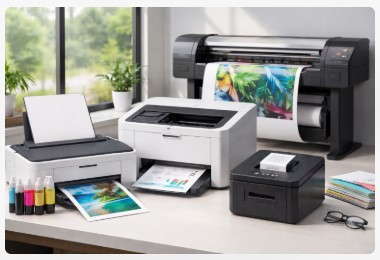
Types of Printers Explained: Complete Guide to Inkjet, Laser, Thermal & More
A guy named Mike walked into my shop two years ago looking defeated. He’d bought three printers in eighteen months, and every single one was a disaster.
The first was a dirt-cheap inkjet he grabbed at a big-box store. Great for photos, terrible for the fifty-page reports he needed for his construction business. Print speed? Painfully slow. Ink cost? Through the roof. When the quality started dropping, he printed a printer test page that showed nozzle clogs he didn’t know how to fix.
His second attempt was a laser printer he found on sale. Fast text, great for documents — but then his wife tried printing school photos and nearly threw it out the window. The colors looked like a bad photocopy from 1995. Another test page confirmed what I could’ve told him upfront: laser printers just aren’t made for photos.
Printer number three was some “all-in-one” special he hoped would finally do everything. Spoiler: it didn’t. By the time he came to see me, Mike had wasted over $800 on printers that just didn’t fit his life. We ran a simple diagnostic together, and that test page told the whole story in about thirty seconds.
Sound familiar?
Here’s the thing I’ve learned after a decade fixing these machines: most people don’t actually need a “better” printer. They need the right type of printer for what they actually do. Once you understand the different types of printers and how they match up with your real needs, everything changes. You stop guessing. You stop wasting money. You stop wanting to throw electronics out the window.
In this guide, I’m walking you through every major printer category — inkjet, laser, thermal, and more. We’ll cover what each one does best, where they fall short, and exactly which one belongs in your home, office, or workshop. Consider this your printer types explained for beginners crash course, served up with a decade’s worth of real-world stories and a whole lot of caffeine.
By the time we’re done, you’ll never buy the wrong printer again.
Quick Answer: What Are the Main Types of Printers?
If you’re in a hurry, here’s the short version. I’ll break each one down in detail coming up, but this gives you the lay of the land.
The main types of printers fall into a few core categories, each built for specific jobs. Think of it like choosing a vehicle — you wouldn’t take a sports car to move furniture, right? Same deal here.
Inkjet printers spray liquid ink through tiny nozzles. They’re your go-to for photos, colorful school projects, and general home use. The quality on glossy paper? Gorgeous. The speed? Meh. But for most families, they hit the sweet spot.
Laser printers use toner powder and heat to fuse text onto paper. These things are speed demons. If you’re printing mostly black-and-white documents, a laser will run circles around an inkjet and cost way less per page. Offices love ’em for a reason.
Thermal printers are the unsung heroes of the shipping world. No ink, no toner — just heat on special paper. Every Amazon label you’ve ever seen? Probably came from one of these. They’re fast, quiet, and ridiculously reliable.
Now, if someone asks what are the 4 main types of printers, I’d add all-in-one printers to that list. These combine printing, scanning, copying, and sometimes faxing into one machine. Most inkjets and lasers come in all-in-one versions now, so they’re technically a feature rather than a totally separate technology. But for practical purposes, they deserve their own spot.
Beyond these core four, you’ve got specialists:
- Dot matrix printers that hammer ink through ribbons for those old-school carbon copy forms. Warehouses and repair shops still swear by ’em.
- LED printers that work like lasers but with fewer moving parts. Super reliable, less to break.
- 3D printers that build objects layer by layer. Totally different beast, but worth mentioning.
- Wide format printers for banners, posters, and blueprints. Anything wider than standard paper lives here.
That’s the bird’s-eye view. But if you really want to understand which one belongs in your life, stick with me. I’ve got stories about each of these that’ll save you some serious headaches.
Inkjet Printers: Best for Photos & Home Use
Let me paint you a picture. You’ve got a stack of family photos, a kid’s school project due tomorrow, and maybe a document or two. That’s where inkjet printers shine.
How Inkjet Printers Actually Work
Inside every inkjet, there’s a print head with thousands of microscopic nozzles. We’re talking smaller than a human hair. These little guys spray tiny droplets of liquid ink onto paper as it rolls through. The print head zips back and forth, building your image one pass at a time, like an artist painting with incredible precision.
Most consumer models use four ink colors — cyan, magenta, yellow, and black. Mix them together, and you get every color under the sun. Fancy photo printers sometimes add extra shades like light cyan or gray for even smoother gradients.
The Different Flavors of Inkjet
Walk into any office supply store, and you’ll find three main types:
Standard home inkjets are what most families start with. They print decent photos, handle documents fine, and cost anywhere from $50 to $150. The catch? Those cheap printers often have expensive ink habits.
Photo printers take things up a notch. More ink colors, better paper handling, and software tuned for perfect skin tones and rich landscapes. If you’re serious about photography, this is your lane.
Then there are refillable tank systems — Epson calls theirs EcoTank, Canon has MegaTank, HP uses Smart Tank. These are absolute game-changers. Instead of swapping cartridges every few months, you pour ink from bottles into built-in tanks. One set of bottles can last years. I had a customer switch from standard cartridges to an EcoTank and save over $200 in the first year alone. The upfront cost is higher — think $300 to $400 — but the math works out fast if you print regularly.
Most inkjets these days are also all-in-one printers, which means they scan and copy too. And yeah, nearly all of them are wireless printer types now. You can send stuff from your phone, your laptop, probably your smart fridge if you’re fancy enough.
The Good, The Bad, and The Clogged
Let’s be real about what inkjets do well and where they struggle.
The pros: Photo quality is outstanding. You can print on all sorts of paper — glossy, matte, cardstock, even fabric if you know what you’re doing. And the upfront cost won’t make you wince.
The cons: They’re slower than lasers. Like, noticeably slower. If you need fifty pages in two minutes, an inkjet will leave you waiting. Cost per page adds up too — standard cartridges are expensive little things. And if you let an inkjet sit unused for a few weeks, those tiny nozzles can clog. That’s when prints start looking streaky or missing colors.
So Is Inkjet the Best Printer for Home Use?
For most families? Yes, absolutely. The photo quality alone makes them worth it. School projects look great. Holiday cards shine. Documents come out clean enough for anything short of a formal business proposal.
But here’s where that whole inkjet vs laser printer question comes in. If you mostly print text, rarely touch photos, and need things fast, a laser might actually suit you better. I’ve seen too many people buy inkjets for offices and regret it six months later.
The sweet spot for inkjet is mixed use — a little of everything, with an emphasis on quality over speed. If that sounds like your life, stick with inkjet. Just maybe spring for one of those tank systems. Your wallet will thank you.
According to Epson’s official EcoTank Pro ET-5850 specifications, you can “save up to 80 percent on ink with low-cost replacement bottles,” with a cost per color page as low as 2 cents. This is the real-world math that makes tank printers a game-changer for high-volume home printing.
Next up, let’s look at the speed demons of the printer world. You know, the ones offices can’t live without.
Laser Printers: Best for Offices & High Volume
If inkjets are the friendly neighborhood generalists, laser printers are the focused specialists. These machines are built for one thing above all else: moving through paper like it’s their job. Because honestly? It is.
How Laser Printers Actually Work
I’ll keep this simple because you don’t need an engineering degree. Inside every laser printer, there’s a spinning drum that gets zapped with a laser beam. Yes, an actual laser. That beam creates an invisible pattern of static electricity on the drum.
Toner — which is basically super-fine plastic powder — sticks to the charged areas. Then the paper rolls through, the toner transfers over, and a hot component called a fuser melts that powder onto the page. Permanently. You can rub it, get it wet, whatever. That text isn’t going anywhere.
No liquid ink. No drying time. Just heat, powder, and speed.
The Two Main Flavors: Monochrome vs Color
Monochrome laser printers do one thing and do it incredibly well: print black text on white paper. They’re simple, reliable, and cheaper to run than just about anything else. Perfect for lawyers, accountants, students grinding out essays, or anyone whose world revolves around words.
Color laser printers add cyan, magenta, and yellow toner to the mix. They can print charts, graphs, logos, and basic marketing materials. But here’s the honest truth — they’re not photo printers. Colors look good enough for business reports, but skin tones? Landscapes? Not so much. I’ve had too many people buy color lasers hoping for photo quality and walk away disappointed.
Pros: Why Offices Swear By Lasers
Speed is the headline. Entry-level lasers hit 20 to 25 pages per minute. Workgroup models push 40, 50, even 60. You don’t wait around.
Cost per page is ridiculously low. We’re talking 2 to 5 cents for black and white. Compare that to 15 or 20 cents with standard inkjet cartridges, and the math gets real interesting real fast.
Text quality is razor sharp. Those letters are fused into the paper. No bleeding, no smudging, no nonsense.
Toner doesn’t dry out. Leave a laser printer untouched for six months, and it’ll fire right up. Try that with an inkjet, and you’re cleaning clogged nozzles for an hour.
Cons: What You’re Trading Off
Upfront cost stings a little. A decent color laser runs $250 to $500. Workgroup models climb higher. But remember that cost-per-page math? It catches up fast.
They’re bulky. Laser printers have more internal hardware — drums, fusers, toner hoppers. They take up space and weigh twice as much as comparable inkjets.
Photo quality is… fine. That’s the word. Fine for charts, fine for presentations. But don’t expect gallery-worthy prints. Different tool for a different job.
The Law Firm Story
A few years back, a small law office came to me frustrated. They were burning through inkjet cartridges every few weeks — $80 here, $100 there. Legal briefs, discovery documents, client correspondence. All text, all the time.
We ran the numbers together. Their inkjet was costing about 18 cents per page. A solid monochrome laser would drop that to around 3 cents. They made the switch, and I checked in a year later. They’d saved over $600. The printer paid for itself in four months.
That’s the laser printer story in a nutshell. Higher ticket price, lower long-term cost.
So Is Laser the Best Printer for Small Business?
If your world revolves around documents — contracts, reports, spreadsheets, emails — then yes. A monochrome laser is probably your best friend. You’ll save money, save time, and never curse another clogged nozzle.
For mixed use with occasional photos? Maybe reconsider. Or keep a cheap inkjet around for the photo stuff and let the laser handle the heavy lifting.
That’s the beauty of understanding office printer types comparison. You pick the tool that fits the job.
For a small office, speed matters. According to Brother’s official HL-L2460DW specifications, this monochrome laser printer achieves print speeds up to 36 pages per minute. When you’re printing hundreds of pages, that speed difference compared to an inkjet adds up to real time saved.
Next up, let’s talk about the printers that don’t use ink at all. Seriously.
Thermal Printers: Best for Labels & Receipts
Ever wonder how stores print receipts so fast? Or how Amazon sellers magically produce shipping labels without ever changing an ink cartridge? That’s thermal printing at work.
These machines are the unsung heroes of the printing world. No ink. No toner. Just heat and special paper doing a little chemical dance.
How Thermal Printers Actually Work
Here’s where things get weird in the coolest way possible. Thermal printers don’t spray or fuse anything. They just… burn.
Direct thermal printers use paper coated with a heat-sensitive chemical. When the print head gets hot, it zaps the paper in specific spots. Those spots turn black. That’s your text, your barcode, your receipt. No cartridges, no ribbons, no mess. The paper itself is the ink.
Thermal transfer printers work a little differently. They use a heated ribbon that melts wax or resin onto labels. The prints last longer and hold up better against heat, sunlight, and curious fingers. Shipping labels you want to last? Thermal transfer. Receipt that’ll sit in a wallet for a week? Direct thermal works fine.
Both methods are fast, quiet, and mechanically simple. Fewer moving parts means fewer things to break.
Why E-commerce Sellers Can’t Live Without Them
A few years back, an Etsy seller named Sarah walked into my shop looking frazzled. She’d been printing shipping labels on her regular inkjet — cutting, taping, fighting with paper jams. Every order took forever. She was spending more time packaging than making her actual products.
I set her up with a basic thermal label printer. Six-inch rolls, peel-and-stick labels, USB connection. Showed her how to plug it in and hit print.
She came back a month later to thank me. What used to take an hour now took fifteen minutes. No more cutting. No more tape. No more “out of ink” panics at 10 PM. She’d saved hours every single week.
That’s the thermal printer magic. They’re not generalists. They’re specialists. And for their specific job, nothing else comes close.
The Pros: Why People Switch
No ink, no toner, ever. Zero. Your ongoing cost is just the labels or paper. That makes thermal printers arguably the printer with lowest running cost you can buy.
Speed is ridiculous. We’re talking inches per second. A four-by-six shipping label prints in about two seconds flat.
Reliability through the roof. Thermal heads last for years. I’ve seen receipt printers with millions of prints on them still going strong.
Dead quiet. No whining gears, no grinding print heads. Just a gentle whir.
The Cons: What You’re Giving Up
Special paper only. You can’t grab any old copy paper and feed it through. Thermal printers need their specific media — heat-sensitive paper or coated labels.
Prints can fade. Leave a receipt in a hot car or under direct sunlight, and it’ll slowly disappear. Thermal transfer solves this for shipping labels, but direct thermal receipts? They’re temporary by design.
One-trick pony. You’re not printing photos or documents on these. They do labels, receipts, barcodes, and wristbands. That’s the list.
Thermal vs Inkjet: Not Even a Competition
Here’s the thing about thermal printer vs inkjet comparisons: they’re different tools for completely different jobs. Asking which is better is like asking whether a hammer is better than a saw. Depends if you’re building a deck or cutting a board.
For labels, receipts, and shipping — thermal wins, no contest. For photos, school projects, and general home use — inkjet every time.
So What About Dot Matrix?
You might be wondering where what is a dot matrix printer used for fits into all this. Dot matrix is the old-school cousin that’s still kicking around warehouses and repair shops. It uses impact printing — literally hammering ink through a ribbon — to create carbon copies. Think invoices, packing slips, multipart forms.
Thermal can’t do carbon copies. Dot matrix can. But dot matrix is loud, slow, and sounds like a robot having a tantrum. Trade-offs everywhere.
Next up, let’s talk about the printers that combine everything — the all-in-ones that try to do it all.
All-in-One vs Single Function Printers
Let me ask you something. How much stuff is sitting on your desk right now? A printer, maybe a separate scanner, that old fax machine you haven’t used since 2019? Desktop real estate is valuable, and clutter has a way of creeping up on you.
That’s where all-in-one printers enter the chat.
What Is a Multifunction Printer, Really?
An all-in-one printer — or multifunction printer (MFP) if you want to sound fancy — does exactly what the name promises. It prints, scans, copies, and often faxes all from one box. One power cord, one USB or network connection, one space on your desk.
Most inkjets and lasers come in all-in-one versions now. You’re not choosing between printer types anymore. You’re choosing whether you want the extra features.
I’ve got a client who runs a real estate office out of her home. She prints contracts, scans signed documents, copies IDs, and maybe faxes twice a year. Before the all-in-one, she had three separate machines taking up half her desk. Now she has one tidy unit and space left over for actual work.
The Pros: Why People Love Multifunction Printers
Space-saving is the obvious win. One machine instead of two or three. If you work from a small desk or share an office, this matters more than you’d think.
Cost-effective when you break it down. Buying separate printers, scanners, and fax machines adds up fast. A decent all-in-one runs $150 to $400 and covers all your bases. The math works.
Convenience is hard to beat. Scan something, print it, copy it, all from the same control panel. No walking across the room, no switching cables, no hunting for drivers.
Wireless features are standard now. Most all-in-ones let you scan directly to your phone or email. Print from anywhere in the house. It’s the little things.
The Cons: The Hidden Trade-Off
Here’s the honest truth that salespeople won’t tell you. If one function breaks, you lose everything.
I saw this happen with a small accounting firm. Their all-in-one’s scanner died. Just the scanner. The printer still worked fine, but they couldn’t scan client documents anymore. They had two choices: live without scanning or replace the whole machine. They replaced it.
With separate devices, a broken scanner means you buy a new scanner. Maybe $100. With an all-in-one, a broken scanner means a new printer, scanner, and copier all at once. Maybe $300.
Something to think about.
Multifunction Printer vs Standalone: How to Choose
Here’s the framework I use with my clients. Ask yourself three questions.
First, how much do you scan? If it’s occasional — contracts, receipts, kids’ artwork — an all-in-one is perfect. If you scan hundreds of pages weekly, consider a dedicated scanner and a separate printer. Dedicated scanners are faster, have document feeders that actually work, and when one breaks, you still have the other.
Second, how much desk space do you have? Tiny home office? Get the all-in-one. Spacious shop with room to spread out? Separate devices give you flexibility.
Third, what’s your backup plan? If your printer dies, can you survive without printing for a week while the replacement ships? If your scanner dies, same question. Separate devices mean you’re never completely down.
Real Talk from the Workshop
A graphic designer I know runs two separate machines — a high-end photo printer and a fast document scanner. She prints photos all day and scans client work constantly. When her scanner jammed last year, she kept printing jobs while waiting for the repair. No downtime, no lost income.
Her neighbor, a freelance writer, uses a basic all-in-one laser. Prints articles, scans research, copies the occasional ID. If his machine died tomorrow, he’d replace it same day. The all-in-one makes sense for his life.
Same neighborhood, totally different needs.
The Bottom Line on All-in-One Printers
Multifunction printers are perfect for most homes and small offices. They save space, save money, and handle everything the average person needs. Just know what you’re signing up for. One machine to rule them all, and one machine to take it all away if something breaks.
If your work depends on scanning or copying every single day, consider keeping them separate. A little redundancy goes a long way.
Next up, let’s talk about the weird and wonderful specialists — dot matrix, LED, wide format, and the printers that build things from scratch.
Specialty Printers (Quick Overview)
Not every printer fits neatly into the home or office box. Some are built for specific jobs, specific industries, or specific obsessions. Let’s run through the specialists you might encounter.
Dot Matrix: The Old-School Workhorse
Remember that loud, grinding noise you’d hear in old offices? That was a dot matrix printer doing its thing. These machines use a print head that literally hammers pins against an inked ribbon, striking the paper to create dots. It’s impact printing at its most mechanical.
So what is a dot matrix printer still doing alive in 2026? Simple: multipart forms. Those carbon-copy invoices, warehouse picking slips, and repair orders with three layers? Only impact printers can print all copies at once. Thermal can’t. Inkjet can’t. Laser can’t.
They’re loud, slow, and sound like a tiny jackhammer. But in warehouses, auto shops, and industrial settings, they’re absolutely irreplaceable.
This is the perfect example of the difference between impact and non-impact printers. Impact printers physically strike the paper. Non-impact printers — inkjet, laser, thermal — use heat, spray, or toner without touching. Both have their place.
LED Printers: Laser’s Smarter Cousin
LED printers work almost exactly like lasers, but with one key difference. Instead of a single laser bouncing off mirrors to draw the image, they use a row of tiny LEDs. Thousands of them, lined up across the page.
Fewer moving parts means less that can break. No spinning mirrors to misalign. No complex optical path to clean. Just solid-state reliability.
When people ask about led printer vs laser printer differences, I tell them this: for most offices, you won’t notice. They print the same speed, same quality, same everything. The LED just does it with slightly simpler guts.
Wide Format Printers: Go Big or Go Home
Ever wonder how banners, posters, and architectural blueprints get made? Wide format printers handle anything wider than standard letter or legal paper. We’re talking 24 inches, 36 inches, even wider.
Architects use them for blueprints. Sign shops use them for banners. Photographers use them for gallery prints that demand attention. They’re not cheap, and they’re not small, but when you need to go big, nothing else works.
3D Printers: Building Things from Scratch
Now we’re in completely different territory. Types of 3D printers vary widely, but they all share one thing: they build objects layer by layer from the ground up.
FDM printers melt plastic filament and lay it down like a high-tech hot glue gun. SLA printers use lasers to harden liquid resin into solid form. SLS printers fuse powder with lasers for industrial-strength parts.
I’ve got a friend who runs a small prototyping shop. He designs a part on his computer, hits print, and walks away. Hours later, he’s holding a physical object he can test, modify, and improve. Magic? Basically.
Dye-Sublimation: Photos That Pop
Here’s a niche one. Dye-sublimation printers use heat to turn solid dye into gas, which then bonds with specially coated materials. The results are smooth, continuous tones — no visible dots like inkjet.
Professional photo labs use them. Textile printers use them for custom fabrics. Even some souvenir shops use them for mugs and phone cases. The colors are rich, the finish is durable, and the process feels like science fiction.
Quick Reference
| Printer Type | Best For | Cool Factor |
|---|---|---|
| Dot Matrix | Multipart forms | Still kicking after 40 years |
| LED | Reliable office printing | No moving mirrors to break |
| Wide Format | Banners, blueprints | Go big or go home |
| 3D | Prototypes, custom objects | Printing actual things |
| Dye-Sub | Photos, textiles | Colors like magic |
Specialty printers don’t make sense for everyone. But when they make sense for you, nothing else will do.
How to Choose the Right Printer (Decision Guide)
I’ve walked hundreds of people through this exact conversation. They sit across from me at the shop counter, overwhelmed by options, and I ask them three simple questions. By the time they answer, the right printer is usually obvious.
Let me save you the trip.
Question 1: What Do You Actually Print?
This sounds basic, but you’d be amazed how many people skip it.
Mostly photos? Like real photos — family portraits, vacation shots, prints for frames? You want an inkjet. Nothing beats the color smoothness. Professional photo printers with extra ink colors take it even further.
Mostly text documents? Reports, contracts, essays, spreadsheets? Look at laser printers. They’re faster, sharper, and cheaper per page. If color charts or graphs matter, get a color laser. If not, monochrome saves you money.
Mostly labels and shipping? E-commerce seller? Small business shipping products? You need a thermal label printer. Trust me on this. Printing labels on an inkjet is like cutting grass with scissors. Possible, but why would you?
Mixed use — a bit of everything? Welcome to the majority. An all-in-one inkjet with refillable tanks usually fits best. Good photos, decent speed, reasonable costs.
Question 2: How Much Do You Print Each Month?
Grab a rough number. Ballpark is fine.
Light printing (under 100 pages) — Any decent printer works. Cost per page matters less. A basic inkjet or small laser both get the job done.
Medium printing (100 to 500 pages) — Now running costs start to bite. Look at high-yield inkjet tanks or monochrome lasers. That $50 printer with $40 cartridges will eat you alive here.
Heavy printing (500+ pages) — You need a workhorse. Multifunction lasers, production-style machines, or commercial-grade equipment. The upfront cost stings, but the per-page math makes it worthwhile.
I had a real estate agent printing 800 pages monthly on a cheap inkjet. She was replacing cartridges every two weeks. Switched to a laser and cut her printing costs by 70 percent.
Question 3: What’s Your Real Budget?
Here’s where people trip up. They look at the price tag and ignore everything else.
Upfront cost is what you pay today. That $60 printer feels like a steal.
Running cost is what you pay over time. Ink, toner, paper, maintenance. That $60 printer might cost you $300 a year to run.
Total cost of ownership is the only number that matters. Add upfront cost plus three years of supplies. Compare that across options. Sometimes the $300 printer saves you $500 in the long run.
Quick Recommendations by Situation
Based on a decade of watching people get this right (and wrong), here’s my shortcut guide.
Home and family – Grab a wireless all-in-one inkjet. Tank system if you print regularly, standard cartridges if it’s occasional. You’ll handle school projects, photos, and the random document without breaking a sweat. That’s the best printer for home use for most people.
Student on a budget – Basic inkjet or a small black-and-white laser. Essays need sharp text, and lasers deliver. If you need color for projects, inkjet wins. Know your assignments before buying.
Home office mix – Color laser or a high-yield inkjet. You’re printing client documents, maybe occasional marketing materials, personal stuff. Balance speed, quality, and cost. This is the sweet spot for printer for remote work setups.
Small business – Multifunction laser all the way. You need reliability, speed, and professional-looking output. Scanning and copying built-in saves desk space and hassle. The best printer for small business is almost always a laser MFP.
E-commerce seller – Two printers. Get a thermal label printer for shipping, and a separate laser for documents. Trying to combine them frustrates everyone. I learned this the hard way.
Photographer or artist – Professional photo inkjet. Extra ink colors, wide format if you need it, paper handling that doesn’t scratch your work. Don’t compromise here. Your art deserves better.
One Last Thought
You don’t need the perfect printer. You need the right printer for right now. Technology changes, your needs change, and that’s okay.
Pick something that fits today’s answers to those three questions. In a few years, ask them again.
Next up, let’s tackle the questions I hear every single week. Spoiler: you’re probably wondering about some of them too.
Cost Comparison: Inkjet vs Laser (Real Numbers)
Let’s talk money. Because at the end of the day, that’s what really decides which printer ends up in your office.
I’ve run these numbers a hundred times for clients, and the results still surprise people. The cheap printer isn’t always cheap. The expensive one sometimes pays for itself.
Breaking Down Cost Per Page
Here’s the real math behind what you’ll spend over time.
Standard inkjet cartridges run about 10 to 20 cents per page. Sometimes more for photo printing with those tiny cartridges. That $30 color cartridge might only last 150 pages. Do the math — that’s 20 cents right there.
Refillable tank inkjets drop that to 3 to 8 cents per page. One set of ink bottles can last thousands of pages. The upfront cost is higher — think $300 instead of $80 — but the per-page savings add up fast.
Black and white laser printers are the efficiency kings. We’re talking 2 to 5 cents per page. Toner cartridges cost more upfront but last forever. A $70 toner might give you 2,500 pages. That’s under 3 cents each.
Color laser printers run 10 to 15 cents per page. More expensive than black and white, but still competitive with standard inkjets. The trade-off is photo quality, which isn’t laser’s strong suit.
Three-Year Total Cost: Real Examples
Let me walk you through two actual clients. Names changed, numbers real.
Sarah, the home user. She prints about 50 pages a month. School projects, family photos, recipes, the occasional document. With a standard inkjet, her math looked like this:
- Printer: $80
- Ink over three years: roughly $400
- Total: $480
She switched to a tank system on my recommendation:
- Printer: $300
- Ink over three years: $120
- Total: $420
Saved $60 over three years. Not huge, but the convenience of not changing cartridges every few months? Priceless.
Mike, the office user. Remember him from the introduction? Construction business, printing 400 pages a month. Reports, estimates, contracts. All text, all the time.
His inkjet nightmare:
- Printer: $100
- Ink over three years: $1,800 (yes, really)
- Total: $1,900
After switching to a monochrome laser:
- Printer: $350
- Toner over three years: $350
- Total: $700
That’s a $1,200 difference. Mike saved over $400 each year by choosing the right type. The laser paid for itself in four months.
So Which Printer Has the Lowest Running Cost?
For black and white text at any serious volume, laser wins, no contest. Those 2 to 3 cents per page add up to real money.
For mixed use with photos and occasional printing, tank inkjets take the crown. You get photo quality without the cartridge tax.
For very light printing — under 30 pages a month — the printer buying guide math changes. Running costs matter less. Buy whatever fits your budget and don’t stress.
Inkjet vs Laser: Which Is Better for Your Wallet?
Here’s the honest answer. It depends on what you print and how much.
Print mostly photos, low volume? Inkjet, preferably tank-based.
Print mostly text, medium to high volume? Laser, and don’t look back.
Print a mix of everything, moderate volume? Tank inkjet or color laser, depending on whether photos or speed matter more.
I’ve watched people save thousands by running these numbers before buying. And I’ve watched people waste hundreds by grabbing whatever was on sale at the office supply store.
The choice is yours. But now you’ve got the real numbers to make it.
FAQ
Over the years, these are the questions I hear most often at my shop. Straight answers, no fluff—based on real repairs and real conversations with folks just like you.
What are the 4 main types of printers?
The four main printer types are inkjet printers (best for photos and home use), laser printers (ideal for offices and text), thermal printers (for labels and receipts), and dot matrix printers (for multipart forms). Each uses different technology for specific needs. Think of them as specialized tools—you wouldn’t use a hammer to screw in a lightbulb.
Which is better: inkjet or laser printer?
Inkjet is better for photos, color graphics, and occasional home use. Laser wins for offices, text documents, and high-volume printing because it’s faster and cheaper per page. I’ve seen small businesses save thousands by choosing laser over inkjet. Your decision really comes down to what you print most.
What is the best printer for home use?
The best printer for home use is typically a wireless all-in-one inkjet or a refillable tank system like Epson EcoTank or Canon MegaTank. These offer low running costs, excellent photo quality, and built-in scanning. Plus, most are eco-friendly printer types that reduce plastic waste from cartridges.
What is a thermal printer used for?
Thermal printers are used for receipts at checkout counters, shipping labels for e-commerce, barcode labels in warehouses, and even medical equipment printing. They work by applying heat to special paper—no ink or toner needed. In the thermal printer vs inkjet debate, thermal wins hands-down for labels and receipts.
Are laser printers good for photos?
Laser printers can print decent photos for basic business use, but they can’t match inkjet quality. Inkjet printers create smooth color transitions essential for realistic skin tones and landscapes. If photos matter to you, stick with a photo-specific inkjet and save the laser for documents.
What is a dot matrix printer used for?
Dot matrix printers are used for multipart forms like invoices, shipping documents, and warehouse picking lists. They create carbon copies by physically striking an inked ribbon—something no other printer type can do. This classic example of the difference between impact and non-impact printers shows why old tech sometimes sticks around.
What is a multifunction printer?
A what is a multifunction printer question comes up constantly in my shop. It’s simply a printer that also scans, copies, and often faxes—all in one machine. Most inkjets and lasers now come in all-in-one versions, saving desk space and money compared to buying separate devices.
What’s the difference between impact and non-impact printers?
The difference between impact and non-impact printers is simple: impact printers physically strike the paper (like dot matrix), while non-impact printers use heat, spray, or toner without touching (inkjet, laser, thermal). Impact printers are louder but necessary for carbon copies. Non-impact printers are quieter and higher quality for everyday use.
What types of printer paper should I use?
The types of printer paper vary by printer type. Inkjets need coated paper for photos but work with plain for documents. Lasers require paper that handles heat without curling. Thermal printers need their special heat-sensitive paper. Using the wrong paper is like putting diesel in a gas car—it won’t end well.
Are there eco-friendly printer options?
Absolutely. Eco-friendly printer types include refillable tank inkjets that eliminate cartridge waste, energy-efficient laser printers with Energy Star ratings, and thermal printers that use no consumables except paper. Some manufacturers even offer cartridge recycling programs. Every little bit helps.
Conclusion
Let’s wrap this up with the stuff I actually want you to remember.
Match the printer to your life, not the other way around. That’s the biggest lesson from every client I’ve ever helped. The right printer makes your life easier. The wrong one becomes a constant source of frustration. Understanding the different types of printers and what they actually do well is half the battle.
Look past the price tag. That $50 printer at the big-box store might cost you $500 in ink over the next few years. The $300 tank system or laser could save you real money. Always calculate total cost—purchase price plus supplies. A solid printer buying guide 2025 should always include that math.
Don’t overbuy, but don’t underbuy either. A commercial production printer is overkill for a home office. A basic inkjet will die young in a busy workplace. Be honest about your volume and your needs.
You’re not alone in this. I’ve been fixing these machines for over a decade, and I still get questions every single day. That’s fine. That’s normal. The goal isn’t to become a printer expert overnight. It’s to make an informed choice that works for you.
Still Not Sure How to Choose a Printer?
That’s okay. Drop your situation in the comments—what you print, how much, where you use it. I read every single one and answer as many as I can.
Or check out our other buying guides for specific brands and models. We’ve got deep dives on the best options for every category we covered here.
Thanks for sticking with me through all 2,000 words. Now go find the printer that actually fits your life. And if you get stuck, you know where to find me.

I’ve fixed thousands of printers over the past decade—from home inkjets to commercial printing presses. Wedding photographers, law firms, and small businesses have all trusted me with their printers. Every guide comes from real workshop experience, not theory.